

Apply RU 19.28 Patch on Oracle 19c Database: In this article we will discuss about how to Apply RU 19.28 Patch on Oracle 19c Database (Standalone).
Steps to Apply RU Patch on Oracle 19c Database:
- Environment Details
- Download the patch from MOS (My Oracle Support)
- Unzip Patch
- Check OPatch Utility version and Update OPatch Utility
- Check Applied List of patches
- Check Conflict
- Shutdown Database
- Stop Listener
- Backup Oracle Home/Inventory
- Apply Patch
- Check Applied List of patches
- Start LISTENER
- Startup Database
- Apply SQL changes (datapatch)
- Verify from dba_registry_sqlpatch
- Verify INVALID objects
Environment Details:
Platform			        :	Linux x86_64
Hostname			:	orakldba.localdomain
DB Version			:	Oracle 19c (19.3)
File system			:	Normal
RAC				        :	No
CDB				        :	Yes
No of PDBs			:	1
DB Name				:	ORCL
PDB Name			:	DELHI
Oracle Home			:	/u01/app/oracle/product/19.0.0/dbhome_1
Patch Location			:	/var/oled/softwares/patch/37960098
Central Inventory		:	/u01/app/oraInventory
Download the patch from MOS (My Oracle Support):
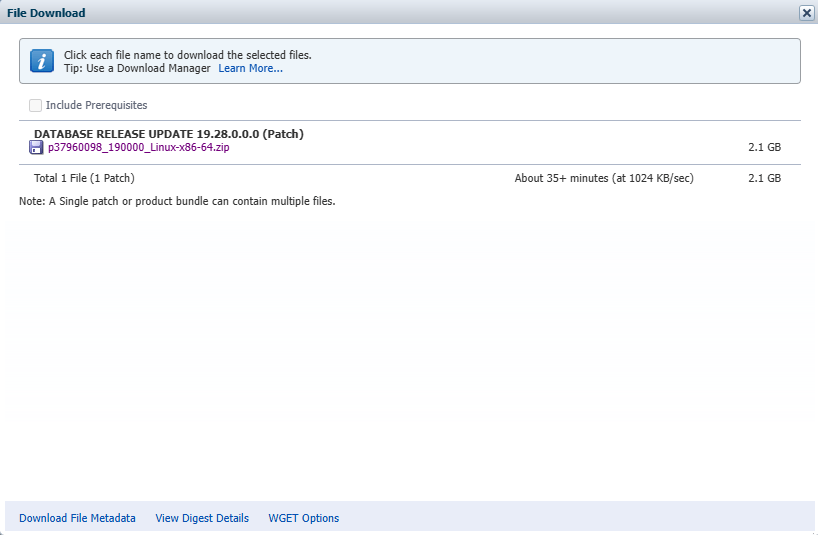
Unzip Patch:
[oracle@orakldba ~]$ cd /var/oled/softwares/patch/
[oracle@orakldba patch]$
[oracle@orakldba patch]$ ls -ltrh
total 2.2G
-rwx------. 1 oracle oinstall 2.2G Aug 19 13:30 p37960098_190000_Linux-x86-64.zip
-rwx------. 1 oracle oinstall  70M Aug 19 13:30 p6880880_190000_Linux-x86-64.zip
[oracle@orakldba patch]$
[oracle@orakldba patch]$
[oracle@orakldba patch]$ unzip p37960098_190000_Linux-x86-64.zip
[oracle@orakldba patch]$
[oracle@orakldba patch]$
[oracle@orakldba patch]$ ls -ltrh
total 2.2G
drwxr-xr-x. 5 oracle oinstall   81 Jul 15 11:45 37960098
-rw-rw-r--. 1 oracle oinstall 2.3M Jul 15 20:46 PatchSearch.xml
-rwx------. 1 oracle oinstall 2.2G Aug 19 13:30 p37960098_190000_Linux-x86-64.zip
-rwx------. 1 oracle oinstall  70M Aug 19 13:30 p6880880_190000_Linux-x86-64.zip
[oracle@orakldba patch]$
Check OPatch Utility version and Update OPatch Utility:
[oracle@orakldba ~]$ cd $ORACLE_HOME/OPatch
[oracle@orakldba OPatch]$
[oracle@orakldba OPatch]$ ./opatch version
OPatch Version: 12.2.0.1.17

OPatch succeeded.
[oracle@orakldba OPatch]$


Here we can see the current OPatch version is 12.2.0.1.17. You must use the OPatch utility version 12.2.0.1.46 or later to apply this patch. Oracle recommends that you use the latest released OPatch 12.2.0.1.xx version for DB 19.0.0.0.0, which is available for download from My Oracle Support patch 6880880 by selecting "OPatch for DB 19.0.0.0.0" from the Select a Release dropdown and also select the "Platform or Language".


[oracle@orakldba OPatch]$
[oracle@orakldba OPatch]$ cd /var/oled/softwares/patch/
[oracle@orakldba patch]$
[oracle@orakldba patch]$
[oracle@orakldba patch]$ ls -ltrh p6880880_190000_Linux-x86-64.zip
-rwx------. 1 oracle oinstall 70M Aug 19 13:30 p6880880_190000_Linux-x86-64.zip
[oracle@orakldba patch]$
[oracle@orakldba patch]$
[oracle@orakldba patch]$ mv /u01/app/oracle/product/19.0.0/dbhome_1/OPatch /u01/app/oracle/product/19.0.0/dbhome_1/OPatch_bkp
[oracle@orakldba patch]$
[oracle@orakldba patch]$
[oracle@orakldba patch]$ unzip /var/oled/softwares/patch/p6880880_190000_Linux-x86-64.zip -d /u01/app/oracle/product/19.0.0/dbhome_1
[oracle@orakldba patch]$
[oracle@orakldba patch]$
[oracle@orakldba patch]$ cd $ORACLE_HOME/OPatch
[oracle@orakldba OPatch]$
[oracle@orakldba OPatch]$ pwd
/u01/app/oracle/product/19.0.0/dbhome_1/OPatch
[oracle@orakldba OPatch]$
[oracle@orakldba OPatch]$
[oracle@orakldba OPatch]$ ./opatch version
OPatch Version: 12.2.0.1.46

OPatch succeeded.
[oracle@orakldba OPatch]$Verify Applied List of patches:
[oracle@orakldba ~]$ cd $ORACLE_HOME/OPatch
[oracle@orakldba OPatch]$
[oracle@orakldba OPatch]$
[oracle@orakldba OPatch]$ pwd
/u01/app/oracle/product/19.0.0/dbhome_1/OPatch
[oracle@orakldba OPatch]$
[oracle@orakldba OPatch]$
[oracle@orakldba OPatch]$ ./opatch lspatches
29585399;OCW RELEASE UPDATE 19.3.0.0.0 (29585399)
29517242;Database Release Update : 19.3.0.0.190416 (29517242)

OPatch succeeded.
[oracle@orakldba OPatch]$
Check Conflict:
[oracle@orakldba ~]$ cd $ORACLE_HOME/OPatch
[oracle@orakldba OPatch]$
[oracle@orakldba OPatch]$
[oracle@orakldba OPatch]$ pwd
/u01/app/oracle/product/19.0.0/dbhome_1/OPatch
[oracle@orakldba OPatch]$
[oracle@orakldba OPatch]$
[oracle@orakldba OPatch]$ ./opatch prereq CheckConflictAgainstOHWithDetail -ph /var/oled/softwares/patch/37960098
Oracle Interim Patch Installer version 12.2.0.1.46
Copyright (c) 2025, Oracle Corporation.  All rights reserved.

PREREQ session

Oracle Home       : /u01/app/oracle/product/19.0.0/dbhome_1
Central Inventory : /u01/app/oraInventory
   from           : /u01/app/oracle/product/19.0.0/dbhome_1/oraInst.loc
OPatch version    : 12.2.0.1.46
OUI version       : 12.2.0.7.0
Log file location : /u01/app/oracle/product/19.0.0/dbhome_1/cfgtoollogs/opatch/opatch2025-08-25_09-50-53AM_1.log

Invoking prereq "checkconflictagainstohwithdetail"

Prereq "checkConflictAgainstOHWithDetail" passed.

OPatch succeeded.
[oracle@orakldba OPatch]$
Shutdown Database:
SQL> shut immediate;
Database closed.
Database dismounted.
ORACLE instance shut down.
SQL>
SQL>
SQL> Disconnected from Oracle Database 19c Enterprise Edition Release 19.0.0.0.0 - Production
Version 19.3.0.0.0
[oracle@orakldba ~]$
[oracle@orakldba ~]$
[oracle@orakldba ~]$ ps -ef | grep pmon
oracle    228551  187368  0 09:57 pts/4    00:00:00 grep --color=auto pmon
[oracle@orakldba ~]$
Stop Listener:
[oracle@orakldba ~]$ ps -ef | grep tns
root           6       2  0 Aug21 ?        00:00:00 [netns]
oracle      5068       1  0 Aug21 ?        00:00:07 /u01/app/oracle/product/19.0.0/dbhome_1/bin/tnslsnr LISTENER -inherit
oracle    228749  187368  0 09:59 pts/4    00:00:00 grep --color=auto tns
[oracle@orakldba ~]$
[oracle@orakldba ~]$
[oracle@orakldba ~]$ lsnrctl stop LISTENER

LSNRCTL for Linux: Version 19.0.0.0.0 - Production on 25-AUG-2025 09:59:30

Copyright (c) 1991, 2019, Oracle.  All rights reserved.

Connecting to (DESCRIPTION=(ADDRESS=(PROTOCOL=TCP)(HOST=orakldba.subnet07181519.vcn07181519.oraclevcn.com)(PORT=1521)))
The command completed successfully
[oracle@orakldba ~]$
[oracle@orakldba ~]$
[oracle@orakldba ~]$ ps -ef | grep tns
root           6       2  0 Aug21 ?        00:00:00 [netns]
oracle    228754  187368  0 09:59 pts/4    00:00:00 grep --color=auto tns
[oracle@orakldba ~]$
Backup Oracle Home/Inventory:
oraInventory Backup:
===================

[oracle@orakldba ~]$ cat /etc/oraInst.loc
inventory_loc=/u01/app/oraInventory
inst_group=oinstall
[oracle@orakldba ~]$
[oracle@orakldba ~]$
[oracle@orakldba ~]$ cd /u01/app
[oracle@orakldba app]$
[oracle@orakldba app]$
[oracle@orakldba app]$ tar -pcvf /var/oled/backup/OraInventory_Backup.tar oraInventory
[oracle@orakldba app]$
[oracle@orakldba app]$ ls -ltrh /var/oled/backup/OraInventory_Backup.tar
-rw-r--r--. 1 oracle oinstall 14M Aug 22 10:55 /var/oled/backup/OraInventory_Backup.tar
[oracle@orakldba app]$


ORACLE_HOME Backup:
===================

[oracle@orakldba ~]$ cd /u01/app/oracle/product/
[oracle@orakldba product]$
[oracle@orakldba product]$ ls -ltrh
total 0
drwxr-xr-x. 3 oracle oinstall 22 Aug 20 11:01 19.0.0
[oracle@orakldba product]$
[oracle@orakldba product]$
[oracle@orakldba product]$ nohup tar -pcvf /var/oled/backup/Oracle_Home_Backup.tar 19.0.0 &
[1] 16298
[oracle@orakldba product]$ nohup: ignoring input and appending output to ‘nohup.out’

[oracle@orakldba product]$
[oracle@orakldba product]$ jobs -l
[1]+ 16298 Running                 nohup tar -pcvf /var/oled/backup/Oracle_Home_Backup.tar 19.0.0 &
[oracle@orakldba product]$
[oracle@orakldba product]$
[oracle@orakldba product]$ ls -ltrh /var/oled/backup/Oracle_Home_Backup.tar
-rw-r--r--. 1 oracle oinstall 7.5G Aug 22 11:15 /var/oled/backup/Oracle_Home_Backup.tar
[oracle@orakldba product]$
Apply Patch:
[oracle@orakldba ~]$ cd $ORACLE_HOME/OPatch
[oracle@orakldba OPatch]$
[oracle@orakldba OPatch]$
[oracle@orakldba OPatch]$ pwd
/u01/app/oracle/product/19.0.0/dbhome_1/OPatch
[oracle@orakldba OPatch]$
[oracle@orakldba OPatch]$
[oracle@orakldba OPatch]$ ./opatch apply /var/oled/softwares/patch/37960098
Oracle Interim Patch Installer version 12.2.0.1.46
Copyright (c) 2025, Oracle Corporation.  All rights reserved.


Oracle Home       : /u01/app/oracle/product/19.0.0/dbhome_1
Central Inventory : /u01/app/oraInventory
   from           : /u01/app/oracle/product/19.0.0/dbhome_1/oraInst.loc
OPatch version    : 12.2.0.1.46
OUI version       : 12.2.0.7.0
Log file location : /u01/app/oracle/product/19.0.0/dbhome_1/cfgtoollogs/opatch/opatch2025-08-25_10-19-54AM_1.log

Verifying environment and performing prerequisite checks...
OPatch continues with these patches:   37960098

Do you want to proceed? [y|n]
Y
User Responded with: Y
All checks passed.

Please shutdown Oracle instances running out of this ORACLE_HOME on the local system.
(Oracle Home = '/u01/app/oracle/product/19.0.0/dbhome_1')


Is the local system ready for patching? [y|n]
Y
User Responded with: Y
Backing up files...
Applying interim patch '37960098' to OH '/u01/app/oracle/product/19.0.0/dbhome_1'
ApplySession: Optional component(s) [ oracle.network.gsm, 19.0.0.0.0 ] , [ oracle.assistants.asm, 19.0.0.0.0 ] , [ oracle.crypto.rsf, 19.0.0.0.0 ] , [ oracle.precomp.companion, 19.0.0.0.0 ] , [ oracle.rdbms.ic, 19.0.0.0.0 ] , [ oracle.rdbms.tg4db2, 19.0.0.0.0 ] , [ oracle.sdo.companion, 19.0.0.0.0 ] , [ oracle.tfa, 19.0.0.0.0 ] , [ oracle.ldap.ztk, 19.0.0.0.0 ] , [ oracle.options.olap, 19.0.0.0.0 ] , [ oracle.oid.client, 19.0.0.0.0 ] , [ oracle.ons.cclient, 19.0.0.0.0 ] , [ oracle.rdbms.tg4sybs, 19.0.0.0.0 ] , [ oracle.xdk.companion, 19.0.0.0.0 ] , [ oracle.pg4appc, 19.0.0.0.0 ] , [ oracle.pg4appc, 19.0.0.0.0 ] , [ oracle.pg4mq, 19.0.0.0.0 ] , [ oracle.oraolap.mgmt, 19.0.0.0.0 ] , [ oracle.java.sqlj.sqljruntime, 19.0.0.0.0 ] , [ oracle.network.cman, 19.0.0.0.0 ] , [ oracle.rdbms.tg4ifmx, 19.0.0.0.0 ] , [ oracle.rdbms.tg4tera, 19.0.0.0.0 ] , [ oracle.ons.eons.bwcompat, 19.0.0.0.0 ] , [ oracle.options.olap.api, 19.0.0.0.0 ] , [ oracle.net.cman, 19.0.0.0.0 ] , [ oracle.rdbms.tg4msql, 19.0.0.0.0 ] , [ oracle.jdk, 1.8.0.191.0 ] , [ oracle.jdk, 1.8.0.391.11 ]  not present in the Oracle Home or a higher version is found.

Patching component oracle.rdbms.rsf, 19.0.0.0.0...

Patching component oracle.rdbms.util, 19.0.0.0.0...

Patching component oracle.rdbms, 19.0.0.0.0...

Patching component oracle.assistants.acf, 19.0.0.0.0...

Patching component oracle.assistants.deconfig, 19.0.0.0.0...

Patching component oracle.assistants.server, 19.0.0.0.0...

Patching component oracle.blaslapack, 19.0.0.0.0...

Patching component oracle.buildtools.rsf, 19.0.0.0.0...

Patching component oracle.ctx, 19.0.0.0.0...

Patching component oracle.dbdev, 19.0.0.0.0...

Patching component oracle.dbjava.ic, 19.0.0.0.0...

Patching component oracle.dbjava.jdbc, 19.0.0.0.0...

Patching component oracle.dbjava.ucp, 19.0.0.0.0...

Patching component oracle.duma, 19.0.0.0.0...

Patching component oracle.javavm.client, 19.0.0.0.0...

Patching component oracle.ldap.owm, 19.0.0.0.0...

Patching component oracle.ldap.rsf, 19.0.0.0.0...

Patching component oracle.ldap.security.osdt, 19.0.0.0.0...

Patching component oracle.marvel, 19.0.0.0.0...

Patching component oracle.network.rsf, 19.0.0.0.0...

Patching component oracle.odbc.ic, 19.0.0.0.0...

Patching component oracle.ons, 19.0.0.0.0...

Patching component oracle.ons.ic, 19.0.0.0.0...

Patching component oracle.oracore.rsf, 19.0.0.0.0...

Patching component oracle.perlint, 5.28.1.0.0...

Patching component oracle.precomp.common.core, 19.0.0.0.0...

Patching component oracle.precomp.rsf, 19.0.0.0.0...

Patching component oracle.rdbms.crs, 19.0.0.0.0...

Patching component oracle.rdbms.dbscripts, 19.0.0.0.0...

Patching component oracle.rdbms.deconfig, 19.0.0.0.0...

Patching component oracle.rdbms.oci, 19.0.0.0.0...

Patching component oracle.rdbms.rsf.ic, 19.0.0.0.0...

Patching component oracle.rdbms.scheduler, 19.0.0.0.0...

Patching component oracle.rhp.db, 19.0.0.0.0...

Patching component oracle.rsf, 19.0.0.0.0...

Patching component oracle.sdo, 19.0.0.0.0...

Patching component oracle.sdo.locator.jrf, 19.0.0.0.0...

Patching component oracle.sqlplus, 19.0.0.0.0...

Patching component oracle.sqlplus.ic, 19.0.0.0.0...

Patching component oracle.tfa.db, 19.0.0.0.0...

Patching component oracle.wwg.plsql, 19.0.0.0.0...

Patching component oracle.xdk.rsf, 19.0.0.0.0...

Patching component oracle.oraolap.api, 19.0.0.0.0...

Patching component oracle.ldap.ssl, 19.0.0.0.0...

Patching component oracle.rdbms.locator, 19.0.0.0.0...

Patching component oracle.nlsrtl.rsf.core, 19.0.0.0.0...

Patching component oracle.rdbms.rman, 19.0.0.0.0...

Patching component oracle.oraolap.dbscripts, 19.0.0.0.0...

Patching component oracle.mgw.common, 19.0.0.0.0...

Patching component oracle.rdbms.install.common, 19.0.0.0.0...

Patching component oracle.oraolap, 19.0.0.0.0...

Patching component oracle.network.aso, 19.0.0.0.0...

Patching component oracle.ctx.atg, 19.0.0.0.0...

Patching component oracle.nlsrtl.rsf.lbuilder, 19.0.0.0.0...

Patching component oracle.rdbms.rat, 19.0.0.0.0...

Patching component oracle.ctx.rsf, 19.0.0.0.0...

Patching component oracle.ldap.rsf.ic, 19.0.0.0.0...

Patching component oracle.rdbms.install.plugins, 19.0.0.0.0...

Patching component oracle.rdbms.dm, 19.0.0.0.0...

Patching component oracle.xdk.xquery, 19.0.0.0.0...

Patching component oracle.nlsrtl.rsf, 19.0.0.0.0...

Patching component oracle.nlsrtl.rsf.core, 19.0.0.0.0...

Patching component oracle.nlsrtl.rsf.ic, 19.0.0.0.0...

Patching component oracle.sqlj.sqljruntime, 19.0.0.0.0...

Patching component oracle.network.listener, 19.0.0.0.0...

Patching component oracle.javavm.server, 19.0.0.0.0...

Patching component oracle.ldap.client, 19.0.0.0.0...

Patching component oracle.install.deinstalltool, 19.0.0.0.0...

Patching component oracle.xdk, 19.0.0.0.0...

Patching component oracle.network.client, 19.0.0.0.0...

Patching component oracle.rdbms.hs_common, 19.0.0.0.0...

Patching component oracle.rdbms.drdaas, 19.0.0.0.0...

Patching component oracle.dbtoolslistener, 19.0.0.0.0...

Patching component oracle.sdo.locator, 19.0.0.0.0...

Patching component oracle.ovm, 19.0.0.0.0...

Patching component oracle.rdbms.lbac, 19.0.0.0.0...

Patching component oracle.odbc, 19.0.0.0.0...

Patching component oracle.rdbms.dv, 19.0.0.0.0...

Patching component oracle.rdbms.hsodbc, 19.0.0.0.0...

Patching component oracle.xdk.server, 19.0.0.0.0...

Patching component oracle.xdk.parser.java, 19.0.0.0.0...

Patching component oracle.precomp.common, 19.0.0.0.0...

Patching component oracle.precomp.lang, 19.0.0.0.0...

Patching component oracle.jdk, 1.8.0.201.0...
Patch 37960098 successfully applied.
Sub-set patch [29517242] has become inactive due to the application of a super-set patch [37960098].
Please refer to Doc ID 2161861.1 for any possible further required actions.
Log file location: /u01/app/oracle/product/19.0.0/dbhome_1/cfgtoollogs/opatch/opatch2025-08-25_10-19-54AM_1.log

OPatch succeeded.
[oracle@orakldba ~]$
Check Applied List of patches:
[oracle@orakldba ~]$ cd $ORACLE_HOME/OPatch
[oracle@orakldba OPatch]$
[oracle@orakldba OPatch]$
[oracle@orakldba OPatch]$ pwd
/u01/app/oracle/product/19.0.0/dbhome_1/OPatch
[oracle@orakldba OPatch]$
[oracle@orakldba OPatch]$
[oracle@orakldba OPatch]$ ./opatch lspatches
37960098;Database Release Update : 19.28.0.0.250715 (37960098)
29585399;OCW RELEASE UPDATE 19.3.0.0.0 (29585399)

OPatch succeeded.
[oracle@orakldba OPatch]$
Start LISTENER:
[oracle@orakldba ~]$ lsnrctl start LISTENER

LSNRCTL for Linux: Version 19.0.0.0.0 - Production on 25-AUG-2025 11:28:43

Copyright (c) 1991, 2025, Oracle.  All rights reserved.

Starting /u01/app/oracle/product/19.0.0/dbhome_1/bin/tnslsnr: please wait...

TNSLSNR for Linux: Version 19.0.0.0.0 - Production
System parameter file is /u01/app/oracle/product/19.0.0/dbhome_1/network/admin/listener.ora
Log messages written to /u01/app/oracle/diag/tnslsnr/orakldba/listener/alert/log.xml
Listening on: (DESCRIPTION=(ADDRESS=(PROTOCOL=tcp)(HOST=orakldba.subnet071815xx.vcn07yy17xx.oraclevcn.com)(PORT=1521)))
Listening on: (DESCRIPTION=(ADDRESS=(PROTOCOL=ipc)(KEY=EXTPROC1521)))

Connecting to (DESCRIPTION=(ADDRESS=(PROTOCOL=TCP)(HOST=orakldba.subnet071815xx.vcn07yy17xx.oraclevcn.com)(PORT=1521)))
STATUS of the LISTENER
------------------------
Alias                     LISTENER
Version                   TNSLSNR for Linux: Version 19.0.0.0.0 - Production
Start Date                25-AUG-2025 11:28:43
Uptime                    0 days 0 hr. 0 min. 0 sec
Trace Level               off
Security                  ON: Local OS Authentication
SNMP                      OFF
Listener Parameter File   /u01/app/oracle/product/19.0.0/dbhome_1/network/admin/listener.ora
Listener Log File         /u01/app/oracle/diag/tnslsnr/orakldba/listener/alert/log.xml
Listening Endpoints Summary...
  (DESCRIPTION=(ADDRESS=(PROTOCOL=tcp)(HOST=orakldba.subnet071815xx.vcn07yy17xx.oraclevcn.com)(PORT=1521)))
  (DESCRIPTION=(ADDRESS=(PROTOCOL=ipc)(KEY=EXTPROC1521)))
The listener supports no services
The command completed successfully
[oracle@orakldba ~]$
[oracle@orakldba ~]$
[oracle@orakldba ~]$
[oracle@orakldba ~]$ ps -ef | grep tns
root           6       2  0 Aug21 ?        00:00:00 [netns]
oracle    235319       1  0 11:28 ?        00:00:00 /u01/app/oracle/product/19.0.0/dbhome_1/bin/tnslsnr LISTENER -inherit
oracle    235345  187368  0 11:31 pts/4    00:00:00 grep --color=auto tns
[oracle@orakldba ~]$
Startup Database:
SQL> startup;
ORACLE instance started.

Total System Global Area  402652440 bytes
Fixed Size                  9178392 bytes
Variable Size             285212672 bytes
Database Buffers          100663296 bytes
Redo Buffers                7598080 bytes
Database mounted.
Database opened.
SQL>
SQL>
SQL> show pdbs

    CON_ID CON_NAME                       OPEN MODE  RESTRICTED
---------- ------------------------------ ---------- ----------
         2 PDB$SEED                       READ ONLY  NO
         3 DELHI                          READ WRITE NO
SQL>
SQL>
SQL> exit
Disconnected from Oracle Database 19c Enterprise Edition Release 19.0.0.0.0 - Production
Version 19.28.0.0.0
[oracle@orakldba ~]$
[oracle@orakldba ~]$
[oracle@orakldba ~]$ ps -ef | grep pmon
oracle    235354       1  0 11:32 ?        00:00:00 ora_pmon_ORCL
oracle    235689  187368  0 11:33 pts/4    00:00:00 grep --color=auto pmon
[oracle@orakldba ~]$
Apply SQL changes (datapatch):
[oracle@orakldba ~]$ cd $ORACLE_HOME/OPatch
[oracle@orakldba OPatch]$
[oracle@orakldba OPatch]$ pwd
/u01/app/oracle/product/19.0.0/dbhome_1/OPatch
[oracle@orakldba OPatch]$
[oracle@orakldba OPatch]$ ./datapatch -verbose

SQL Patching tool version 19.28.0.0.0 Production on Mon Aug 25 11:42:18 2025
Copyright (c) 2012, 2025, Oracle.  All rights reserved.

Log file for this invocation:
/u01/app/oracle/product/19.0.0/dbhome_1/cfgtoollogs/sqlpatch/sqlpatch_21874_2025_08_25_11_42_18/sqlpatch_invocation.log

Connecting to database...OK
Gathering database info...done
Bootstrapping registry and package to current versions...done
Determining current state...done

Current state of interim SQL patches:
  No interim patches found

Current state of release update SQL patches:
  Binary registry:
    19.28.0.0.0 Release_Update 250715131139: Installed
  SQL registry:
    Applied 19.3.0.0.0 Release_Update 190416131139 successfully on 21-AUG-25 10.18.24.928744 AM

Adding patches to installation queue and performing prereq checks...done

Installation queue:
  No interim patches need to be rolled back

  Patch 37960098 (Database Release Update : 19.28.0.0.250715 (37960098)):
    Apply from 19.3.0.0.0 Release_Update 190416131139 to 19.28.0.0.0 Release_Update 250715131139

  No interim patches need to be applied

Installing patches...

Patch installation complete. Total patches installed: 2

Validating logfiles...done

Patch 37960098 apply: SUCCESS
  logfile: /u01/app/oracle/cfgtoollogs/sqlpatch/37960098/27384521/37960098_apply_ORCL_CDBROOT_2025Aug25_11_44_52.log (no errors)

Patch 37960098 apply: SUCCESS
  logfile: /u01/app/oracle/cfgtoollogs/sqlpatch/37960098/27384521/37960098_apply_DELHI_2025Aug25_11_46_11.log (no errors)

SQL Patching tool complete on Mon Aug 25 11:48:37 2025

[oracle@orakldba OPatch]$
Verify from dba_registry_sqlpatch:
set lines 500 pages 1000
set long 2000000
col action_time format a12
col action format a10
col comments format a30
col description format a60
col namespace format a20
col status format a10
select to_char(action_time, 'yyyy-mm-dd') as action_time, action, status, description, patch_id from sys.dba_registry_sqlpatch order by action_time;

ACTION_TIME  ACTION     STATUS     DESCRIPTION                                                    PATCH_ID
------------ ---------- ---------- ------------------------------------------------------------ ----------
2025-08-21   APPLY      SUCCESS    Database Release Update : 19.3.0.0.190416 (29517242)           29517242
2025-08-26   APPLY      SUCCESS    Database Release Update : 19.28.0.0.250715 (37960098)          37960098
Verify INVALID objects:
SQL> select count(*) from dba_objects where status='INVALID';

  COUNT(*)
----------
         0

SQL>
Now you have successfully applied RU 19.28 on your Oracle 19c Standalone database…!!!
I hope my written content will helped you. Your suggestions/feedback are most welcome from orakldba.com. Keep learning… Have a great day!!!
Please comment here for your any query related to above content. You can write to mail me through my Email.
Email :- orakldba@gmail.com
LinkedIn :- https://linkedin.com/in/prasantakirtaniya
Twitter :- https://twitter.com/prasantadba
Facebook Page :- https://www.facebook.com/orakldba
Website :- https://orakldba.com
ACE Profile :- https://ace.oracle.com/apex/ace/profile/prasantakirtaniya
Oracle Community :- https://community.oracle.com/customerconnect/profile/discussions/prasantakirtaniya